Inside the Calistack skill tree
Every workout in the app is a node on one of four trees. A node is locked, unlocked or mastered, and a locked node names the prerequisite movement and benchmark that opens it. Logging a set is what moves your state.
By Calistack Team · Updated · Product details verified against the Calistack app. General information, not medical advice.
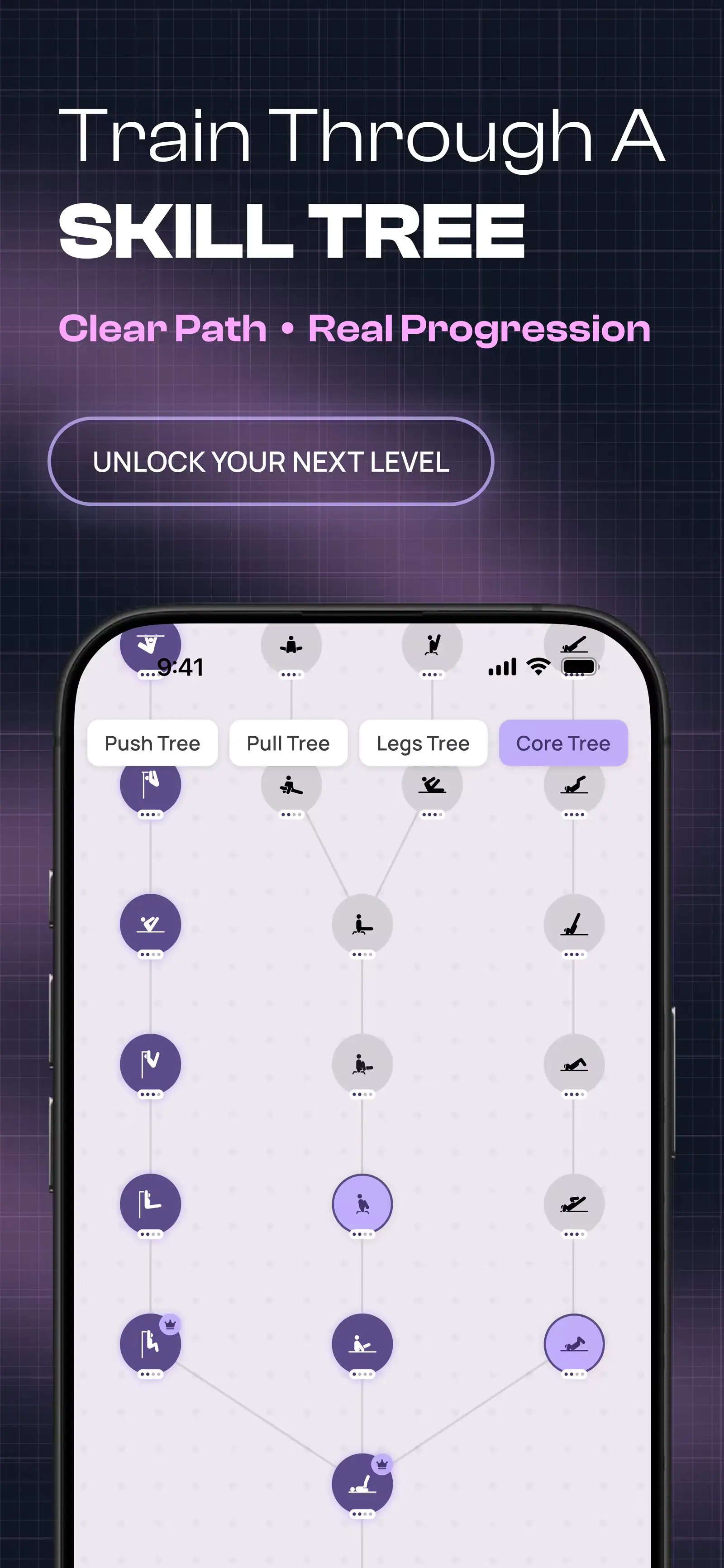
Every workout is a node
A node is one workout in the Calistack catalog: a movement such as a push-up variation, a dip, a pike push-up, or a hold such as a frog stand. Each node carries its name, category, difficulty, a learning-time estimate, and its own unlock and mastery values.
The app has two families of node. Rep-based nodes log repetitions; hold-based nodes log seconds. That distinction follows the node into the player, the rest timer, the session summary and the unlock rules.
- Rep nodes: sets and reps, with a best-set and lifetime-repetition target.
- Hold nodes: sets and hold seconds, with a best-hold and lifetime-seconds target.
- Each node sits on exactly one of four trees: push, pull, legs or core.
Locked, unlocked and mastered
The app exposes three plain-language states. Locked means the node has an unlock rule and no unlock is recorded yet. Unlocked means an unlock is recorded: the rule was met, the baseline assessment opened it as a starter, or you trained it anyway. Mastered means you have met the node's two-part mastery benchmark.
The states are per node and per account. The tree, the skill list and the filters read the same stored facts, so a node cannot be available in one view and locked in another.
- Locked: visible on the tree and in the list; the app explains what opens it.
- Unlocked: trainable now; the player will accept the workout.
- Mastered: the node benchmark is met; the node stays available for maintenance work.
A node with no unlock rule at all is open from the start. Locked is not the same as hidden, deleted or paid.
What happens when you open a locked skill
Tap Start on a locked skill and the app does not simply refuse. It opens a warning that names the prerequisite movement and the benchmark: “It looks like you haven't practiced [movement] yet. We recommend practicing [number] reps of [movement] first to build the strength for this skill.” A button takes you straight to that prerequisite.
The dialog also offers START ANYWAY. The lock is a recommendation with a name, not a wall. The app would rather show you the prerequisite than pretend it can stop you from tapping.
- The warning names the prerequisite movement and the number.
- Go to [movement] opens the prerequisite skill.
- START ANYWAY opens the workout anyway.
- A one-line hint under the actions repeats the rule: Complete N reps of X to unlock.
The app does not enforce the lock as a hard gate: if you start a locked workout and log a set, the app marks that workout as unlocked. The rule still describes the recommended path, and every other node keeps its own rule.
How a node actually unlocks
Behind each lock is one or more unlock rules. A rule names a prerequisite workout and a value: repetitions for a rep-based movement, seconds for a hold. When you log a set in the player, the app compares that set's count with every rule attached to the movement you just trained. If they all pass, the node unlocks.
The threshold is a single set, not a weekly total or a lifetime number. A set of 20 knee push-ups can open the push-up node; five sets of four does not, because the rules are checked against the set you log, one set at a time.
- A rule is a prerequisite workout plus a rep or hold value.
- The check runs when a set is logged, using that set's count.
- Rep rules count reps; hold rules count seconds.
- All rules tied to the trained movement must pass.
- The Next Skill To Unlock panel shows the next node and its rule during rest.
If a node needs rules from more than one prerequisite, train each of those movements to the number it asks for. The node's rule list is the reference; the app is the source of truth.
A worked example: knee push-up to push-up
Suppose the current catalog sets the push-up node's rule at a set of 20 knee push-ups, and its mastery benchmark at a best set of 30 plus a lifetime-volume target. These numbers are an example of the shape. The catalog is versioned, and the app always shows the current value.
You start with knee push-ups, which are open. One session you log a clean set of 20. The rule passes and push-ups unlock. You keep training push-ups; when your best set reaches 30 and your lifetime work reaches the node's total, the app marks push-ups Mastered and shows the achievement in the session summary. That is the whole loop.
A locked node still lets you start. The warning exists so that choosing to skip ahead is a decision, not an accident.
How mastery is awarded
Mastery is a separate two-part benchmark. Your best single set must reach the node's rep or hold benchmark, and your collected work on that node must reach its lifetime-volume target. When both are true, the app writes a Mastered record for the node and shows it in the session summary's Session Achievement cards.
The home progress card counts mastered nodes, and the library filter shows them. Mastery is a status you keep: it does not expire and it does not block later training.
- Part one: a best single set at or above the node benchmark.
- Part two: lifetime volume at or above the node's total target.
- Session Achievement marks nodes Unlocked or Mastered after a session.
- Mastery is a graduation signal, not a technique certificate.
Mastery is not a key that opens other nodes. Other nodes have their own unlock rules; mastery tells you this step is done and you can move on.
Where the benchmark numbers come from
The unlock values and mastery targets are set and revised by the Calistack coaching team and stored in the catalog that syncs to the app. They are shared across accounts: the same rule applies to everyone.
They are working benchmarks, not population percentiles, medical standards or a scientific placement score. We expect them to change as the catalog and user feedback evolve, and a number can change between catalog versions. That is why the app, not this page, is the source of truth for the exact value.
If a rule feels wrong for your body or setup, treat that as information to share with us, not as a diagnosis. The rules are not personalized to injury history, age, bodyweight or equipment.
Four trees, one catalog
The skill tree tab opens four independent trees: push, pull, legs and core. Each graph has a single root, and each node lives on one tree. Progress on push does not gate pull, so you can keep a balanced week while you specialise.
The layout reads like a branch, but the rule is what opens a node. The tree helps you see the path; the node's own unlock rule decides when it becomes available. The skills tab shows the same catalog as a searchable list, so the map and the list tell the same story.
- Push: pressing patterns, from supported push-ups toward pike and handstand work.
- Pull: rows, pull-ups and pulling skills that need a secure bar.
- Legs: squat and single-leg patterns.
- Core: bracing, hollow positions and hanging work.
The skill library view
The skills tab is the catalog as a searchable list. You can search by name, open filters for status, difficulty and category, and clear filters when you want the full list again.
Favourites sit in a strip at the top when you have any. Premium nodes carry a Pro badge in the list and lead to the paywall, so the tree and the list tell the same story about what is available.
Inside a skill page
Opening a node shows its demonstration video, steps, good and bad form cues, areas to watch, recommended supporting exercises and the muscles involved. Category, difficulty and the app's learning-time estimate sit with the title.
Favourite, share and per-skill history sit alongside Start. If the node is locked, the warning above appears instead of silently blocking the button.
Where to start
New accounts answer two questions: push-ups in one clean set, then strict pull-ups. At five and ten reps the app applies cumulative starter unlock groups on the push and pull paths, then opens the app.
It is a starting aid, not a placement test. It does not pick one exact node, score fitness, measure core or leg strength, or certify technique. If you are unsure, start with the easiest open variation and seek coaching for form.
What the tree is not
The unlock rules are app progression rules, not population strength standards, medical clearance or a personalized program. A mastered node does not certify technique, and an unlock does not prove a movement suits every body.
The app includes warm-up guidance, areas-to-watch notes and a stop-if-it-hurts message, but it does not provide individual coaching or diagnosis. If a movement causes pain or your setup is unclear, stop and get qualified help.
- Not a medical or technique assessment.
- Not adjusted to injury history, age, bodyweight or equipment.
- Not a wall: a locked skill can still be started after a warning.
- Some nodes require Calistack Pro; the list and tree mark them.
Inside the Calistack skill tree: common questions
Is a locked node the same as a Pro node?
No. Locked is a progression state: an unlock rule is not met yet. Premium is a separate access gate, and premium nodes carry a Pro badge in the list and the tree. A node can be open but still require Pro.
Can I start a locked workout?
Yes. The detail page warns you, names the prerequisite and offers START ANYWAY, plus a shortcut to the prerequisite skill. Logging a set on that workout marks it unlocked, so the lock is a recommendation rather than an enforced gate; the prerequisite rule remains the app's recommended path.
What exactly does an unlock rule check?
A rule names a prerequisite workout and a number: reps for a rep-based movement, seconds for a hold. When you log a set, the app compares that set's count with every rule attached to the movement you trained. If all of them pass, the node unlocks.
Is the unlock threshold cumulative across a week?
No. The check uses the single set you log. One set that meets the number opens the node; several easier sets that add up to it do not. Hold movements use seconds in the same way.
Does mastering a node unlock the next one?
Mastery is a graduation status, not a key. Other nodes open through their own unlock rules. Mastery tells you this step is done and shows in your achievements; it does not gate or open other nodes.
What does Mastered mean?
A node is mastered when your best single set reaches its rep or hold benchmark and your lifetime work reaches that node's total target. Both values come from the node's catalog record. It is a numeric milestone, not a technique certificate.
Who sets the benchmark numbers, and can they change?
The Calistack coaching team sets and revises them, and they sync to the app as catalog values. They are shared across accounts, are not population percentiles or medical standards, and can change between catalog versions. The app is the source of truth.
Are the rules personalized to my body or injury history?
No. The unlock criteria are shared catalog values. The app does not adjust them to age, bodyweight, injury history or equipment, so treat them as app progression rules and use judgement about your own setup.
Keep exploring
Try it in the app
Calistack is free to download on iOS and Android. The app is where the tree, player and progress live; this page explains how they work.

