Every set, remembered
Calistack records each set as you train, then shows totals for today or the week: duration, workouts, sets and reps, plus a muscle-involvement map and mastery progress. A workout is mastered only when your best set reaches its node benchmark and your lifetime reps reach the node total.
By Calistack Team · Updated · Product details verified against the Calistack app. General information, not medical advice.
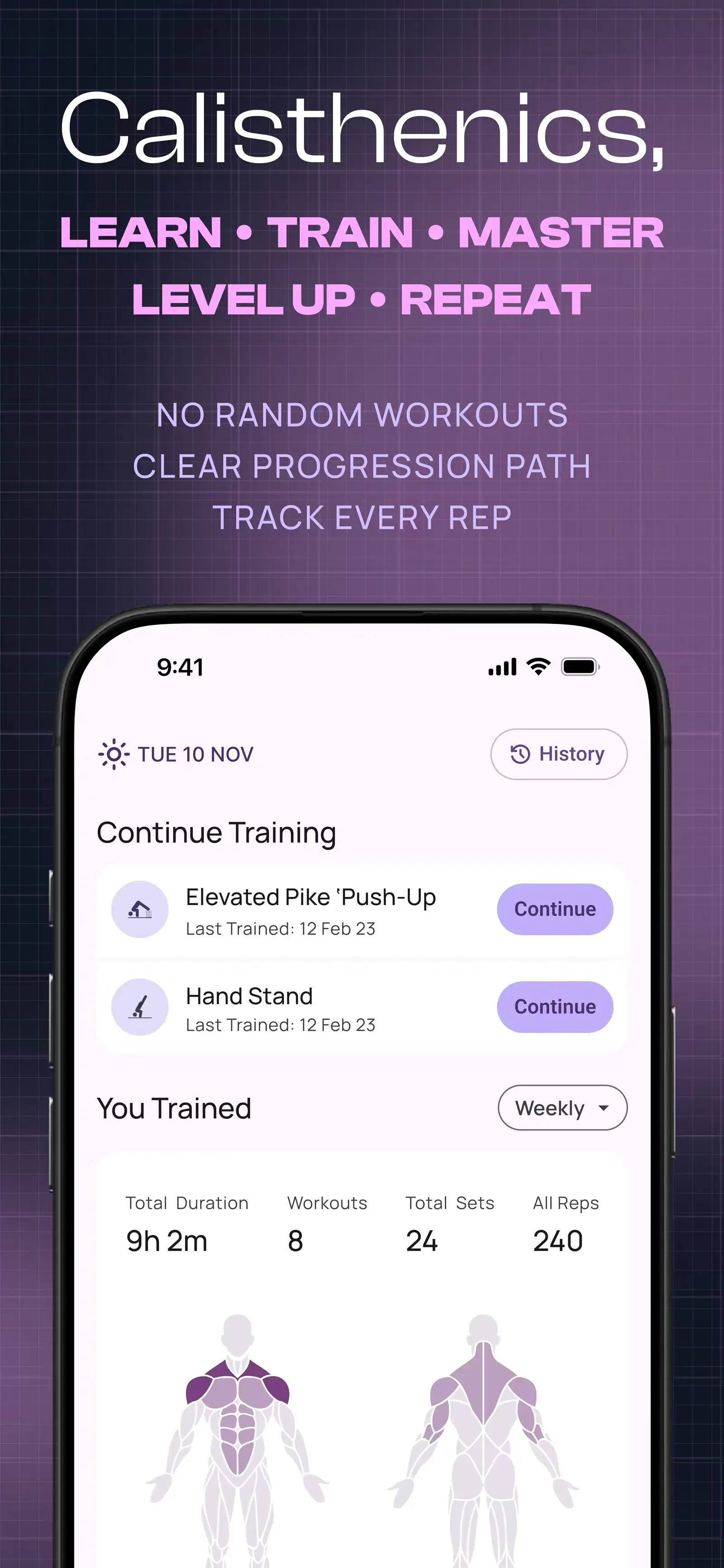
The home dashboard
The home screen opens with the date and a history shortcut. Continue Training surfaces the last node you were working on, and Today's Sessions lists any planned sessions for the current day.
The activity area can switch between today and a weekly view. The window changes the totals, not the underlying history; the app records every set as its own row.
What the totals mean
The You Trained summary shows total duration, workouts completed, sets completed and reps completed for the selected window. Hold-based work is counted separately from rep work in the per-workout detail.
The per-workout list shows the sets you did and highlights the best set. That best set is what the mastery rule checks against the node benchmark.
How mastery actually works
Mastery has two parts in the app: a best-set requirement and a lifetime-volume requirement. The best single set must reach the node's rep or hold benchmark, and your collected work must reach the node's total target.
That means one strong set is not enough on its own, and a pile of easy sets does not replace the benchmark. Both values come from the node's catalog record.
The session summary
After a session, the summary shows totals for the workout, a per-workout breakdown with set pills and a muscle-involvement map. It also shows Session Achievement cards for nodes that were unlocked or mastered during that session.
You can repeat the session or end it. Ending early still produces a summary of the work that was recorded, marked as an early end.
History
Every skill has its own history view grouped by day, and the full history screen lists day, session and workout groupings with pagination. Holds display as seconds; rep work displays as reps.
The empty state says No Training Recorded and explains that history appears after the first completed workout.
No streak mechanic
Calistack is not built around a daily streak counter. Progress is expressed through history, mastery and the session summary rather than a chain that breaks when you rest.
That is deliberate: recovery is part of training, and the app does not punish a rest day or manufacture urgency to protect a streak.
Every set, remembered: common questions
What does mastered mean in Calistack?
Two conditions: your best single set reaches the node's rep or hold benchmark, and your lifetime work reaches that node's total target.
Does Calistack track streaks?
No. There is no daily streak counter in the app. Progress is shown through history, mastery and session summaries.
Can I see history for one skill?
Yes. Each skill has its own history view grouped by day, and the full history screen groups by day, session and workout.
How are holds counted in the stats?
Hold-based work is counted in seconds; rep-based work is counted in reps. The per-workout detail separates the two.
What happens to my summary if I end early?
You still get a summary of the sets that were recorded. It is marked as an early end rather than a completed session.
Keep exploring
Try it in the app
Calistack is free to download on iOS and Android. The app is where the tree, player and progress live; this page explains how they work.

